We are learning to reflect on our experience and document our learning. LEGO groups complete assignment #016 in Google Classroom. Insert a photograph and reflect on your Milo experience. Mars groups finish your slideshow. You may take a gallery walk and review your peers' projects. DO NOW: Open Google Classroom
We are reflecting on our progress attaining learning goals and following action plans. Today you will reflect on your touch typing SMART Goal for Marking Period 2 in Google Classroom. Did you reach your goal? Did you follow your action plan?
Type to me using PRIVATE COMMENT.
I will observe your touch typing in Google Classroom today.
We are reflecting on our progress and writing learning goals. Today you will write your touch typing SMART Goal for Marking Period 2 in Google Classroom.
Type to me using PRIVATE COMMENT.
I will observe your touch typing in Google Classroom today.
We are reflecting on our progress and writing learning goals. Today you will write your touch typing SMART Goal for Marking Period 2 in Google Classroom.
Type to me using PRIVATE COMMENT.
I will observe your touch typing in Google Classroom today.
We are learning how to express our opinions while applying our touch typing skills. Today you will complete a survey. Answer each question the best that you can. Your name is optional, you do not need to type it into the form. At the end of the survey, you will see a submit button. Click the button and your answers are recorded.
We are reflecting on our progress. We are learning how to print screen and crop screenshots.
Today you will finish your Typing Agent Lesson Mastery ePortfolio in Google Classroom. Using Google Slides, you will pasteTyping Agent report screenshots and type SMART Goals. Remember to TURN IN your assignment in Google Classroom when you are done.
Enter your MP 4 screenshot on Slide 14. -Print Screen in Typing Agent, Lesson Mastery Report (use key on keyboard) [You may use Awesome Screenshot too] -Ctrl V in Google Slides to paste
-Crop your image to reveal just the phone and the stars.
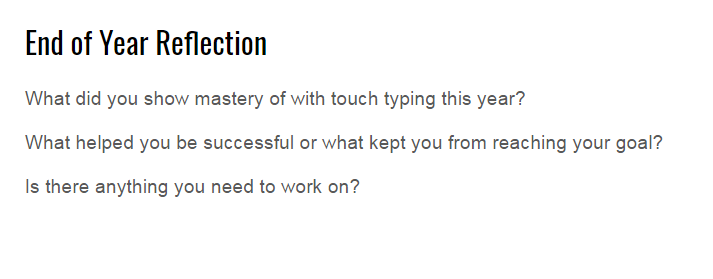
Complete your End of the Year Reflection on Slide 16.
Click TURN IN button in Google Classroom DO NOW: 1. Log in to Typing Agent. Open Typing Agent Reports, Lesson Mastery Report. 2. Log in to Google Classroom and open your ePortfolio. This how-to video will guide you through the steps if you need to review.